The first hacker I met was my ex-colleague @typester. It was around 2006. I peeked over his shoulder and saw him working on some code. As he typed, the black background split in half, a list of text appeared, filtered down with each keystroke. He jumped across files, few seconds in one file, and then another.
He was hitting far more keystrokes than new characters appearing on screen (he was using Emacs :p), but the speed at which he navigated the codebase blew me away. I followed him and started using Emacs.
That episode and later I learned we software engineers read far more code than we write. We should be able to navigate over the codebase and open the code we want, as fast as possible.
The terminal-editor gap 見出しへのリンク
Fast forward to 2026. AI agents like Claude Code and Codex live in the terminal, and I find myself jumping between the terminal and the editor far more often than before. Except there was no links from the terminal to the editor.
OSC8: hyperlinks in the terminal 見出しへのリンク
OSC8 is an ANSI escape sequence for embedding clickable hyperlinks in terminal output, just like <a href="..."> in HTML.
Most modern terminals support it: iTerm2, Ghostty (my pick), and others.
As soon as I learned about OSC8, I started switching to the tools that already support OSC8 natively. For example, eza is a ls alternative that can emit hyperlinks for file paths:
alias l="eza --hyperlink -la"
But each tool has to implement it individually, and many don’t.
osc8wrap: making links clickable in everything 見出しへのリンク
I wanted every file path in my terminal to be clickable, regardless of which tool produced it. So I built osc8wrap.
osc8wrap is a pipe filter and a wrapper around interactive cli tools like Claude Code and Codex that scans text for file paths and URLs and wraps them in OSC8 hyperlinks. It preserves ANSI colors, so you can pipe any colorized output through it.
Also it supports a lot of file path patterns, so you can use it with any tool that produces file paths.
| Pattern | Example |
|---|---|
| Absolute path | /path/to/file.go |
| Home directory path | ~/src/project/main.go |
| With line number | /path/to/file.go:42 |
| With line and column | /path/to/file.go:42:10 |
| With line range | /path/to/file.go:10-20 |
| Relative path | ./src/main.go:10 |
| Extensionless path | ./README, /path/to/LICENSE |
| *file names | Makefile, Dockerfile |
| Git diff paths | a/src/main.go, b/src/main.go |
| HTTPS URL | https://example.com/docs |
osc8wrap does some intelligent path expansion, so even when Claude Code says main.go and omits the paths in between, it will be expanded to the full path.
In my .zshrc:
alias g="git -c color.status=always status -sb | osc8wrap"
alias gd="git diff -w --color=always -M | osc8wrap | less"
alias gl="git log -b -M --stat --color=always --decorate=full | osc8wrap | less"
alias claude="osc8wrap claude"
alias codex="osc8wrap codex"
Now file paths are clickable and open directly in my editor.
symbol-opener: from terminal to definition 見出しへのリンク
File paths were a good start, but we can do better.
When Claude Code or Codex mentions a function or type name, it’s rendered in a highlighted style:
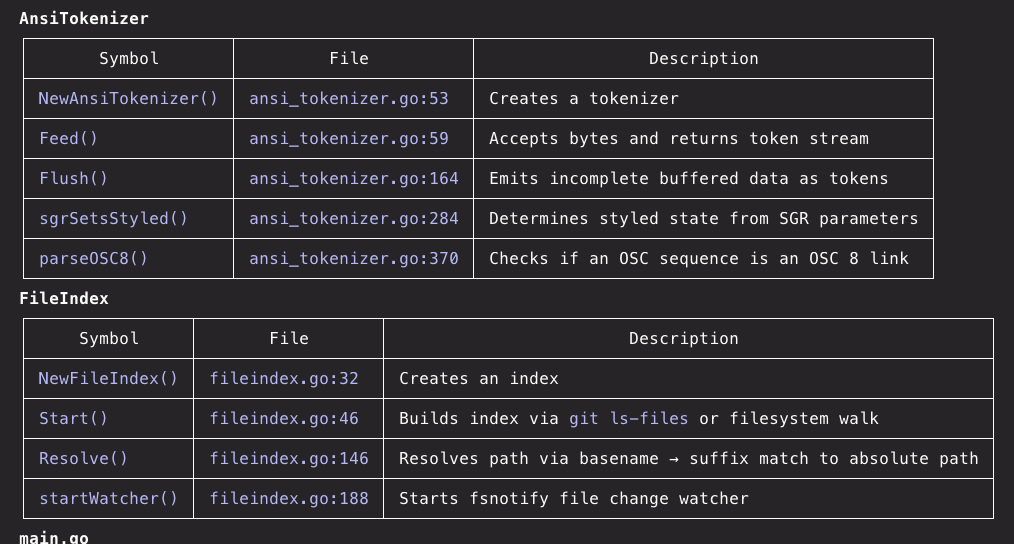
It already looks like a link. It should be one.
osc8wrap detects these ANSI-styled tokens and generates URIs in this format:
cursor://maaashjp.symbol-opener?symbol=NewAnsiTokenizer&cwd=/path/to/project&kind=Function
To handle these URIs, I wrote symbol-opener, a VS Code / Cursor extension. When you click a symbol link, it uses LSP (Language Server Protocol) to find the definition and opens the file at the right line.
Here’s a demo of the full flow — from terminal output to jumping straight to a symbol’s definition:
Available on:
- VS Code Marketplace
- Open VSX Registry (Cursor, Windsurf, etc.)
Twenty years later 見出しへのリンク
Still trying to reach the code as fast as I can.